APP STORE CONNECT ANALYTICS
Your whole funnel, at a glance.
Funnelry turns your App Store Connect data into a clear picture: how people find your app, where they drop off before downloading, and what brings in revenue. Made for indie developers.
- Your API key stays on your device
- No tracking
- Try it with sample apps

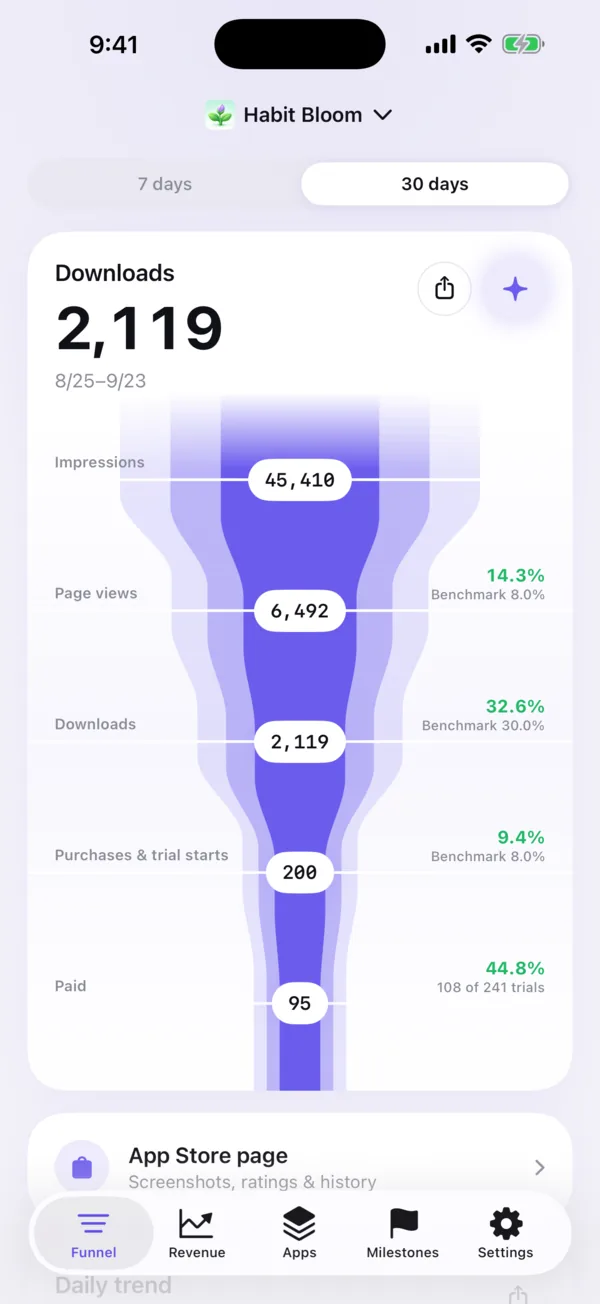
Funnel
See where people drop off.
Impressions, product page views, downloads, purchases and paid users in one flow. Each step is compared with a typical conversion rate, so the weak ones stand out.
-
Impressions
How often your app was shown on the App Store, in search results, browse and more.
-
Page views
How many of those opened your product page.
-
Downloads
How many page visitors went on to download.
-
Purchases & trial starts
In-app purchases, and free trials of your subscriptions starting.
-
Paid
Trials that turned into paid subscriptions.
Screens
The numbers you check every day, in one place.
-
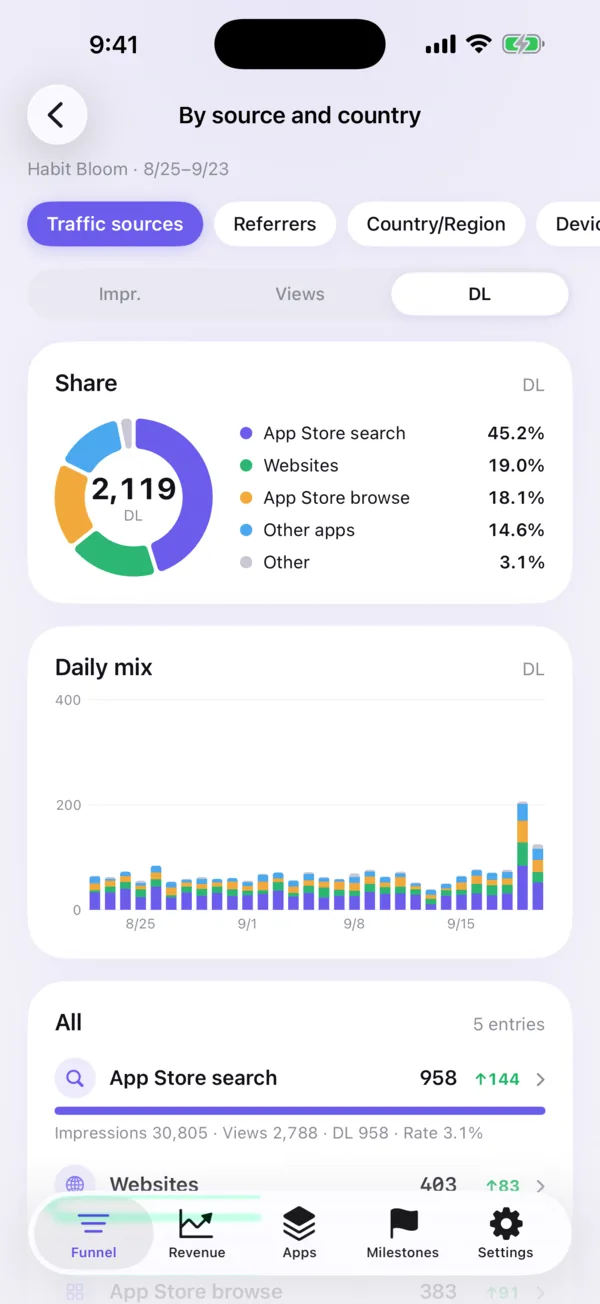
Where downloads come from
Compare sources, referrers, countries and devices
-
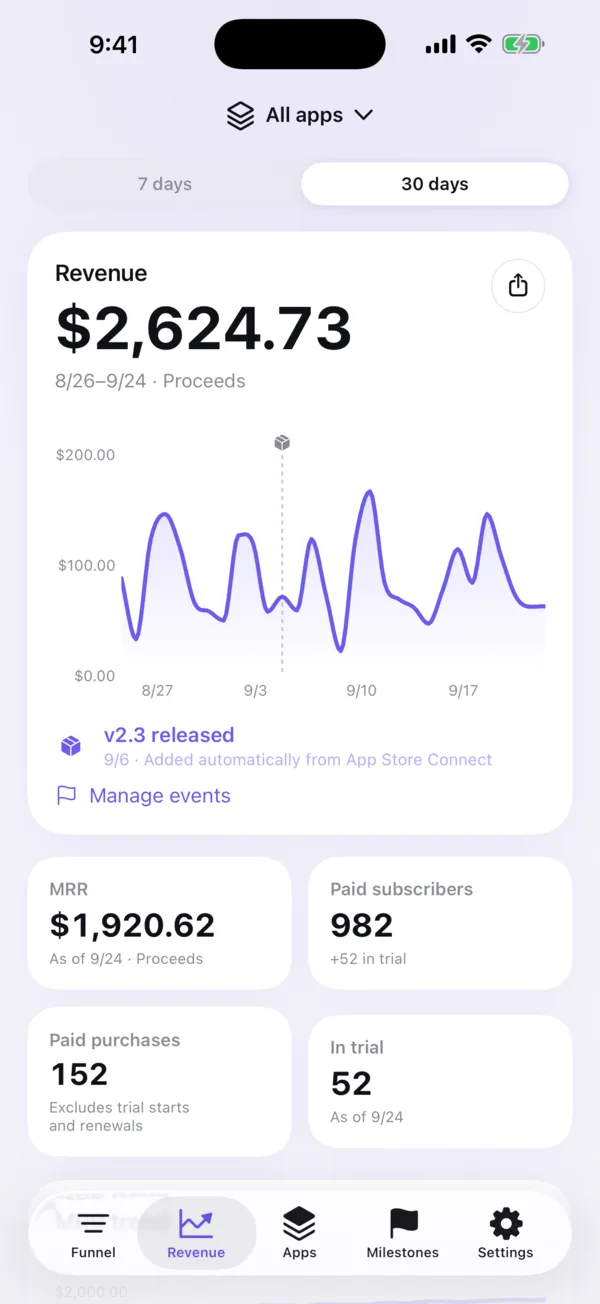
Revenue and subscriptions, daily
MRR, paid subscribers and trials in one place
-
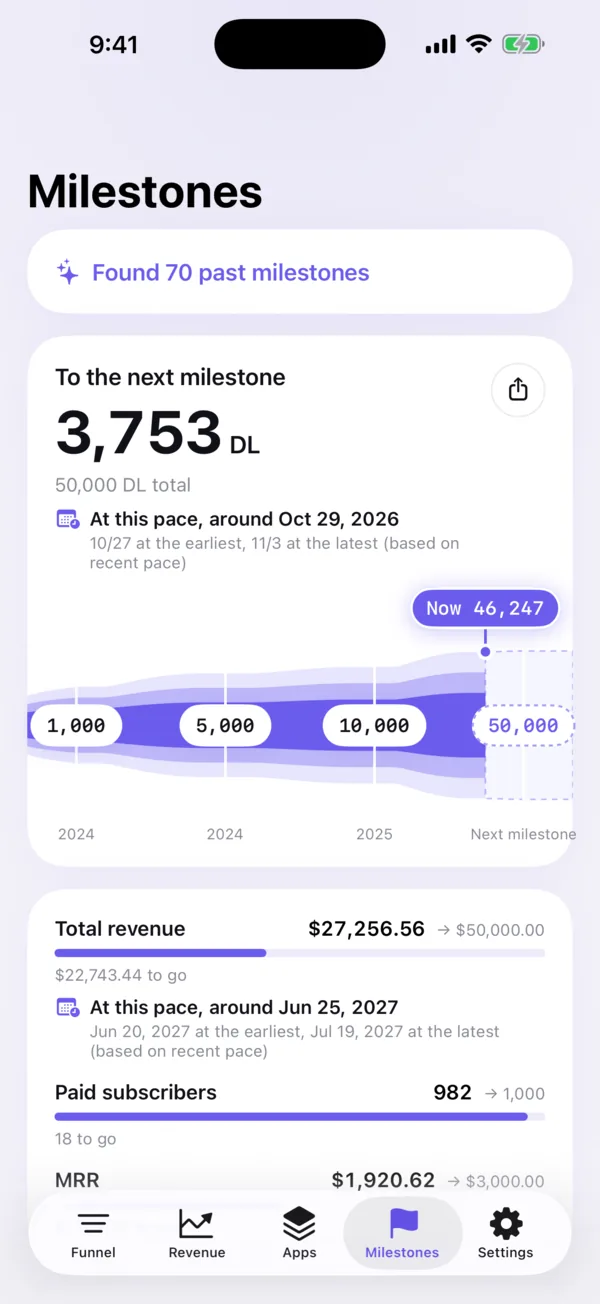
Celebrate every milestone
Earn badges as downloads and revenue grow
-
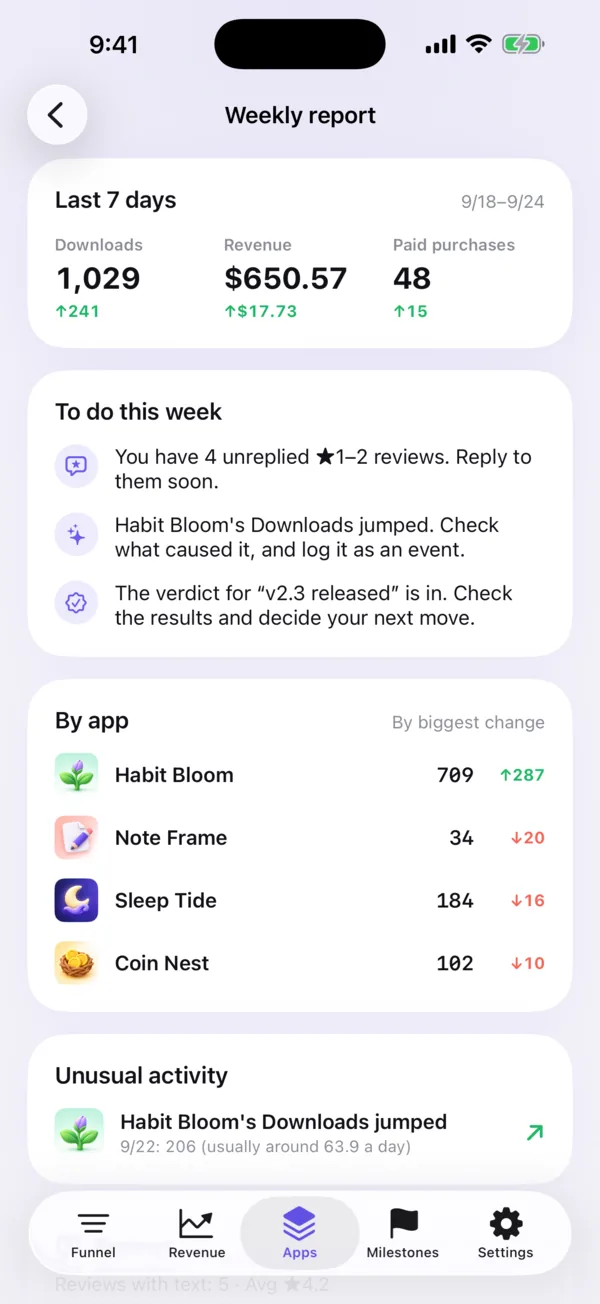
Your to-do list, every week Premium
Never miss a spike, a drop or a low rating
-
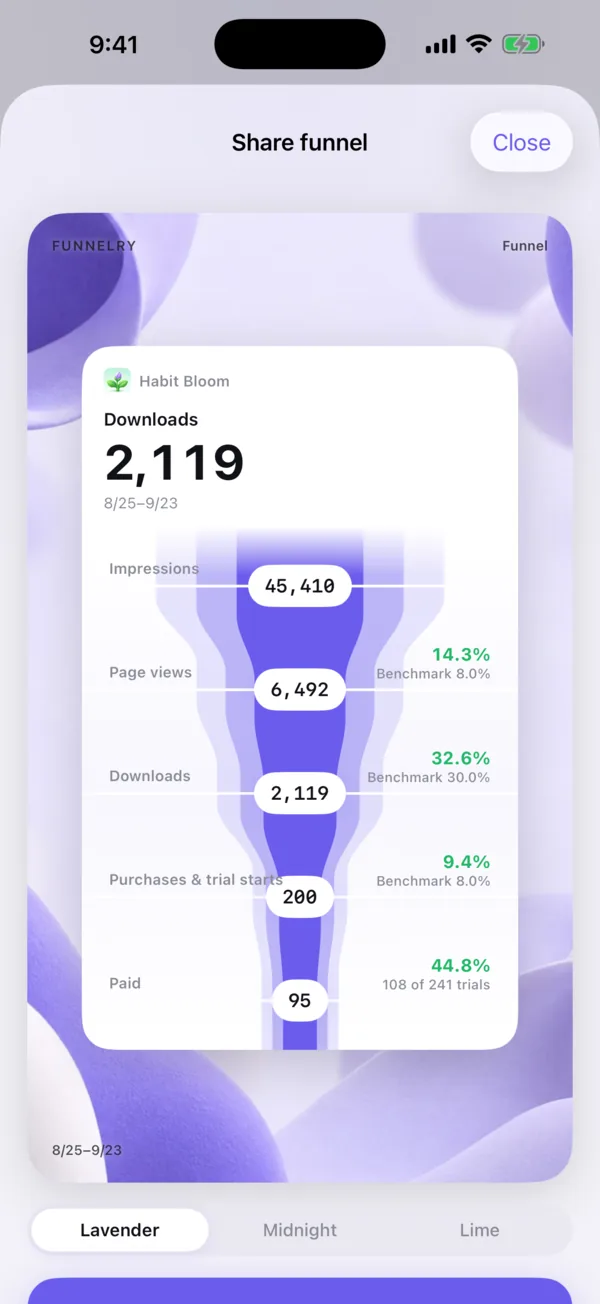
Share your wins, beautifully
Turn your funnel and milestones into images
Features
App Store Connect, easier to read.
-

Sources and countries
Compare App Store search, browse, websites and other apps, plus countries, devices and OS versions, down to the exact site or app that sent people your way.
-

Revenue and subscriptions
Proceeds, MRR, paid subscribers and trials every day, in your own currency.
-
Home Screen widgets
The latest day's downloads and revenue, and the last 14 days, without opening the app.
-

Milestones
Earn a badge each time you pass a milestone in downloads or revenue.
-

Share your wins
Turn your funnel and milestones into beautiful images, ready to share.
-

Reply to reviews
Unanswered ratings and reviews from every country in one place. Reply right away.
Privacy
Straight from Apple to your device.
Funnelry has no servers in between. Your sales and reviews come from Apple to your device with your own API key, and are stored only on your device.
- Your API key is stored only in your device's keychain and is never sent to the developer or any third party
- No analytics or advertising SDKs, and no tracking
- AI analysis and reply drafts run on your device with Apple Intelligence
- The app talks only to Apple, and to open.er-api.com for currency exchange rates
Apple
App Store Connect API
Your iPhone
API key in the keychain
Our servers Not used
Getting started
Just add your API key.
- 01
Create an API key
In App Store Connect, go to Users and Access → Integrations → App Store Connect API, and create a Team Key with Admin access. Download it.
- 02
Add it to the app
Choose the .p8 file and enter your Issuer ID. The Key ID is filled in from the file name. Add your vendor number for sales data.
- 03
Open it every day
Funnel, revenue and reviews in one app. The first time, Apple takes one to two days to prepare impression data.
No key yet? Try it anyway
Tap “Try with sample apps” to explore every screen with data from fictional apps. You can connect anytime later.
Pricing
Your data is free to see.
The funnel, sources and countries, revenue, milestones and reviews are free. Premium adds analysis and forecasts built from your data.

Free
- Funnel with typical conversion rates
- Sources and countries
- Revenue, subscriptions and widgets
- Milestone badges and sharing as images
- Reading and replying to reviews
Premium
Auto-renewable subscription

- AI analysis and tips to improve
- Alerts for unusual spikes and drops
- Countries with room to grow
- Review themes
- Before-and-after impact of releases and campaigns
- Forecasts for your next milestone
- Weekly report with your to-dos
- AI reply drafts and translation
- Clear out reviews that need no reply
- Screenshot history of your product page
- Competitor watch
Yearly
1-week free trial
Monthly
Special first-month price
Prices in your currency are shown in the app. Payment is charged to your Apple Account. The subscription renews automatically unless canceled at least 24 hours before the end of the current period. Manage or cancel it anytime in your App Store account settings.
FAQ
Common questions
Is it free?
Yes. The funnel, sources and countries, revenue and subscriptions, widgets, milestone badges, and reading and replying to reviews are all free. Features that analyze your data, such as AI analysis and the weekly report, are part of Premium (an auto-renewable subscription).
What do I need?
An App Store Connect API key with the Admin role. To see purchases, revenue and subscribers, also enter your vendor number.
Why does the key need the Admin role?
Analytics reports such as impressions start with a one-time report request, and only an Admin key can create it. After that, Apple prepares the reports automatically every day.
Are my API key and data safe?
Your API key is stored only in your device's keychain and is never sent to the developer or any third party. Sales, reviews and other data are requested directly from Apple by your device and stored only on your device. No servers of ours are involved.
Can I try it without an API key?
Yes. Tap “Try with sample apps” to explore every screen with data from fictional apps. You can connect anytime later.
I connected, but there are no impressions yet.
The first time, Apple takes one to two days to prepare the impressions report. Until then, downloads come from the sales report. Analytics data also arrives a few days late.
Which devices are supported?
iPhone, with iOS 18 or later. AI analysis with Apple Intelligence needs a device that supports Apple Intelligence and iOS 26 or later.
Which languages does the app support?
Japanese, English, Chinese (Simplified and Traditional), Korean, Spanish, French and German.
How do I cancel Premium?
Anytime in your App Store account settings (Settings → your name → Subscriptions on iPhone). The subscription renews automatically unless canceled at least 24 hours before the end of the current period. Deleting the app does not cancel it.

Get started
Let the numbers tell you what's next.
No key yet? Try every screen with sample apps.
Download on the App StoreFor iPhone · iOS 18 or later